

Getting people onto the right work at the right time should not feel like spreadsheet Tetris. PSA software gives you one place to plan by role, match skills and availability, and keep schedules and budgets current as things change. You get real-time visibility into capacity and utilization, automatic updates when dates move, and cleaner billing because time and expenses flow from the same tasks people actually worked on. In short, it turns routine admin into rules that the system runs for you, so managers can focus on outcomes, not busywork.
📚 Read more: Automating workflow processes with PSA – Best practices
Why resource management automation matters
Service businesses live or die by how well they plan and use people. Manual spreadsheets and side chats create delays, double booking, and fuzzy forecasts. Professional services automation (PSA) software fixes this by centralizing work and letting rules do the heavy lifting. You still choose priorities. The system removes busywork, updates plans in real time, and keeps finance in step with delivery.
📚 Read more: 5 benefits of professional services automation (PSA) software
What resource automation really does
Automation in PSA is not a magic button. It is a set of rules that quietly runs in the background.
- The system matches skills and availability to project needs, so the best person lands on the task without a dozen calendar checks.
- You can plan by role first, using placeholders, then replace roles with names when hiring or availability settles.
- Allocations can start soft and become hard later. Workload, schedules, and budgets refresh automatically when that switch happens.
- When you move a milestone, the downstream tasks and assignments recalculate right away, which prevents last-minute surprises.
Why this matters: fewer manual edits, fewer copy-paste mistakes, and a plan that stays aligned with reality.
Skills-based allocation with placeholders: real examples
Imagine an engineering firm planning a road project. The project manager adds placeholders for a senior civil engineer and a survey crew. The PSA sees who is free, who has the right certifications, and whose cost rate matches the budget. It proposes two candidates and shows the impact on utilization. The manager picks one, the placeholder becomes a person, and the Estimate to Complete (ETC) and Estimate at Completion (EAC) refresh immediately.
In an IT services team, a new retainer starts next month. The manager creates a sprint template with role placeholders for backend, QA, and a part-time designer. As hiring finishes, names replace roles, and the workload view stays clean. No rework, no broken links.
Real-time visibility and capacity planning
Good resource management depends on visibility. PSA dashboards show who is overallocated, who has idle time, and where a project might slip. Capacity views roll up by person, role, and team. When an approval takes longer than expected or a client adds scope, the system recalculates dates, hours, and budget impact right away.
Forecasting improves because actuals and plans live together. As people log time, the Estimate to Complete (ETC) recalculates, and the Estimate at Completion (EAC) shows whether the project will land inside its target margin. As time lands, ETC adjusts, and EAC updates revenue and cost forecasts for PMs and finance.
Tip: Run a short weekly capacity review focused on the next few weeks. Agree on three actions, then stop. Small, regular corrections beat big, late ones.
📚 Read more: What is capacity planning in resource management?
Schedules that update themselves
Change is constant. A permit arrives late, a dependency finishes early, or a client brings work forward. PSA tools update task dates, allocations, and utilization when you move a milestone. The ripple effects are visible across teams, which means no one learns about a change at the last second. Alerts flag conflicts before they become fires.
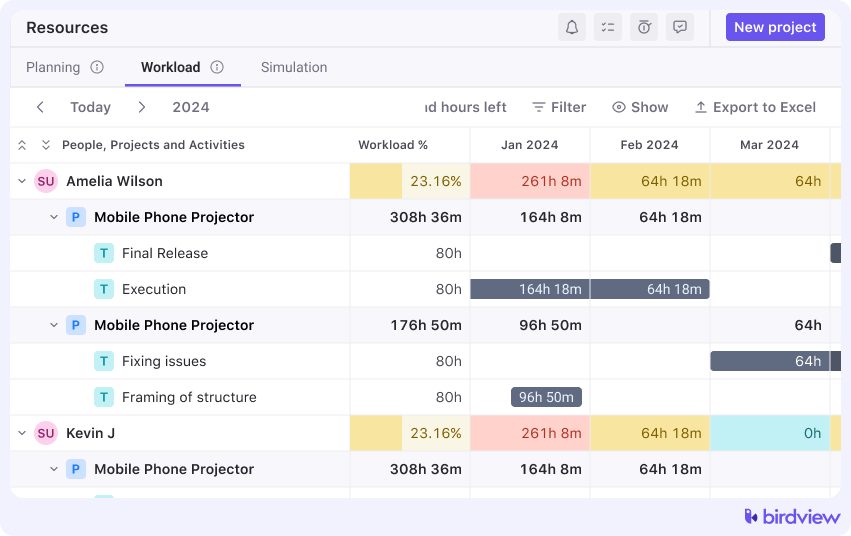
A creative agency example: a campaign’s photo shoot slides by two days. The PSA shifts designer allocations, protects other projects from collisions, and suggests a swap for a video editor who is about to be double-booked. The producer confirms with one click and moves on.
One place for delivery and finance
PSA software puts tasks, time, expenses, rate cards, and billing in one place. People log time against assigned work, approval rules route entries to the right manager, and approved time is locked for invoicing. The result is fewer disputes and faster cash.
Because delivery and finance share data, leaders see utilization, margin, and cash impact without stitching reports together. If a senior consultant spends more hours than planned during a fixed-fee phase, the EAC is updated immediately, and the PM can rebalance the plan before month-end.
Tip: Keep time entry simple. Daily or weekly entries against assigned tasks, a short approval chain, and automatic locking after billing cut errors, for faster invoicing.
📚 Read more: How PSA software supports billing and invoicing
Resource and financial reporting that drives decisions
Automation is only useful if it informs better choices. Reports should help people decide, not just observe. Useful PSA reporting covers resource utilization by role and person, schedule variance, change requests, and profitability by project and client. Portfolio views highlight where dates are at risk and where margin is drifting.
Start small and standardize:
- Utilization bands that show healthy ranges, not just averages.
- Forecast accuracy for hours and revenue, so you can see whether plans are reliable.
- Margin at EAC compared to baseline, which keeps attention on outcomes, not effort.
- Approval cycle time for time and expenses, because slow approvals delay cash.
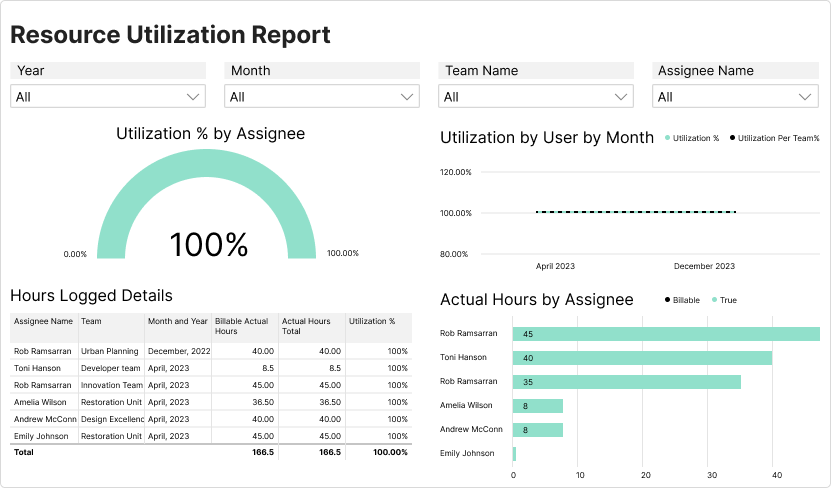
Start with a small set of reports: utilization bands, forecast accuracy for hours and revenue, EAC margin versus baseline, and approval cycle time. Make them easy to find and consistent across teams.
What to automate first in PSA
When introducing automation into your PSA system, it’s best to start small and focus on processes that bring quick, visible value. Here are the first areas worth automating to save time, reduce errors, and create smoother handoffs across teams.
- Project templates with roles: phases, tasks, review gates, rate cards, and role placeholders.
- Soft allocations and alerts: hold tentative bookings for pipeline work; let the system flag conflicts and idle pockets.
- Time capture and approvals: clean codes for billable/non-billable, manager approvals, and monthly locks.
- Deal-to-project creation: connect the CRM so a closed-won deal creates a project from the right template with dates, budget, and permissions.
Common PSA automation pitfalls and how to avoid them
Even the best PSA systems can lose their impact when automation is set up without clear structure or intent. Here are some of the most common pitfalls teams face.
- Too many custom fields. If data entry feels like a tax form, people stop using it. Keep only fields that drive a decision.
- Planning is only done by one person. People change. Plan by role first, then attach names when ready.
- Unclear approval rules. Hours wait in limbo. Define who approves what and within how many days.
- One giant dashboard. No one reads it. Share a few focused views for PMs, resource managers, and finance.
📚 Read more: Connect sales pipeline to PSA: Boost revenue & handoffs
How Birdview PSA supports automation
Teams use Birdview PSA to support this flow with role placeholders, soft and hard allocations, rate cards, and approval rules for time and expenses. Deal-to-project templates help kick off work from Salesforce or HubSpot. For visibility, embedded BI dashboards and shareable Gantt snapshots help leadership and clients stay aligned. If you run Microsoft 365, Outlook add-ins, and Teams notifications make adoption easier. Keep it pragmatic. Turn on two or three features first, prove value, then expand.
📚 Read more: Rate cards for professional services
A short rollout plan
- Week 1: build two templates with roles and rate cards; enable simple time tracking and one approval rule.
- Week 2: import people and skills; start soft allocations for the next 60 days; publish a basic utilization dashboard.
- Week 3: connect CRM fields so Closed won creates a project; run a short session on saved views.
- Week 4: lock time for billing; review ETC and EAC trends; refine templates; agree on a monthly close routine
PSA software automates resource management by matching skills to work, keeping schedules and forecasts current, and aligning finance with delivery. The result is higher utilization, steadier delivery, and cleaner invoices, without burning people out.

