

Once you’ve built a solid resource plan, the next step is putting it to work. Resource scheduling is that step. A resource plan tells you which people, skills, and hours your project needs. A schedule turns that answer into dates, names, and hours on a calendar.
This is where a project takes shape. Scheduling assigns specific resources (individuals or teams) to tasks inside the project timeline, so work happens in the right order at the right time. In the delivery reviews we run with clients, weak schedules break far more projects than weak plans do. The plan looked fine. The calendar never matched it. And when the calendar slips, you get bottlenecks, missed deadlines, and burned-out people.
Resource planning and scheduling: what is the difference?
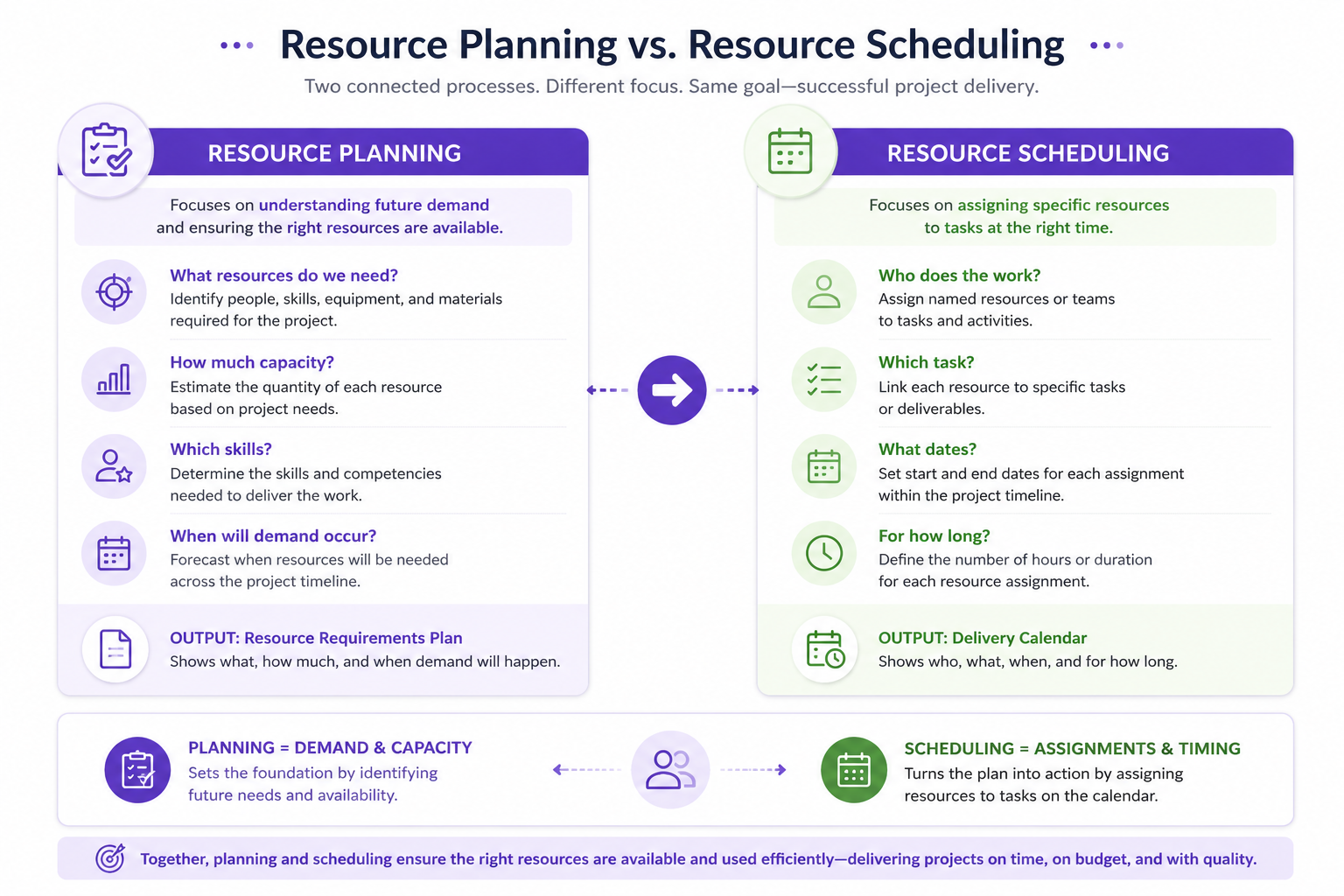
Resource planning and scheduling are two related but distinct processes in project management. People mix them up constantly.
What is resource planning?
Resource planning is the process of identifying the resources a project will need, estimating how much of each one you require, and deciding when and how you will acquire or allocate them. Planning weighs two things against each other: what you have available and what the project demands. The goal is simple. Have the right resources ready before anyone needs them.
What is resource scheduling?
Resource scheduling refers to the actual allocation of resources to specific tasks or activities inside a project. You set the timing for each activity, assign named people or assets to it, and manage how those resources get used over the following days and weeks. Scheduling puts the right resources in the right place at the right time. It also keeps them working efficiently.
Planning answers what and how much. Scheduling answers who and when.
Used together, the two processes keep projects on time, on budget, and at the quality standard you promised. Both demand a clear grasp of project requirements, resource availability, and scheduling constraints. Both also demand honest conversations between the delivery team and everyone who depends on the schedule. In our work with clients, that second part fails far more often than the math does.
What is a resource schedule?
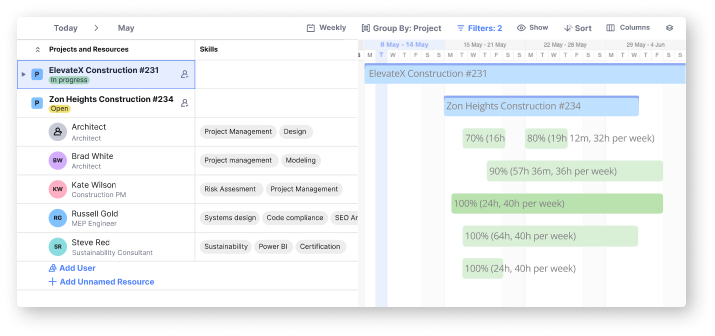
A resource schedule is a plan for how and when your available resources go to specific tasks and projects over time. Those resources can be people, equipment, or materials. Think of it as a road map. It shows you how to get work done without overloading the team or running out of key materials.
The schedule answers three questions: who is doing what, when, and for how long. It also tracks availability, so you don’t double-book a person or leave an important task short on support. Say your project has a deadline in three months. Every person on it needs enough time and capacity to finish their part without creating a bottleneck. That is where a well-organized schedule earns its keep.
Example: You have a team of five, each with a different role. A resource schedule lets you assign work based on what each person can handle and when they’re free. Emma, your graphic designer, owes visual assets to three separate campaigns. Open the schedule and you can see whether all three fit her timeline. If they don’t, you bring in a second designer.
In our own projects, the schedule is what turns a vague staffing conversation into a decision we can defend.
Key objectives of resource scheduling
Resource scheduling has four jobs. Here they are.
Task sequencing: A schedule puts tasks in a logical order. Each one starts only after its prerequisites finish. That order keeps work flowing instead of stalling.
Time management: Give every task a specific timeframe and the project stays on track. Deadlines hold. You avoid delays and cut the risk of overruns.
Handling dependencies: Complex projects are full of tasks that wait on other tasks. A schedule maps those links and coordinates the handoffs, so nothing turns into a bottleneck.
Real-time adjustments: Priorities shift. New challenges land, deadlines move. A schedule lets you reshuffle resources fast, so the right people cover the change.
Done well, resource scheduling puts people and equipment where they are needed. Projects land on time. Work stays organized, and delivery becomes predictable.
Key information needed for resource scheduling
A resource schedule is only as good as the data behind it. Gather these seven inputs first, and the schedule holds up. Skip them, and you rebuild it every week.
| Scheduling Input | What You Need | Why It Matters |
|---|---|---|
| Resources | People, contractors, equipment, materials, and other resources available for project work. | Defines which resources can be assigned to scheduled activities. |
| Availability | Working hours, calendars, leave, existing assignments, and other commitments. | Prevents assigning resources when they are unavailable or already committed elsewhere. |
| Task Requirements | Required skills, roles, experience, estimated effort, and other task-specific requirements. | Helps match each task with resources that have the appropriate skills and capacity. |
| Project Timeline | Project start and end dates, task dates, phases, milestones, and deadlines. | Determines when resources need to be booked and for how long. |
| Dependencies | Predecessor and successor relationships between tasks and activities. | Ensures resources are scheduled in the correct sequence and avoids assigning work before prerequisite tasks are complete. |
| Capacity | Available hours, allocated hours, utilization, workload, and remaining capacity. | Helps prevent overbooking while identifying resources with capacity for additional work. |
| Budget | Resource rates, contractor costs, overtime limits, and planned labor costs. | Ensures scheduling decisions remain financially viable and aligned with the project budget. |
Resource scheduling benefits
Accurate resource scheduling makes teams work faster, hit deadlines, and stop stepping on each other. Small project or large team, the effect is the same. Structure first, clarity second, better outcomes third.
Here are the key benefits:
- Improved efficiency: A clear schedule puts resources where they count and cuts wasted effort. Tasks finish faster. Productivity climbs.
- Reduced conflicts: Scheduling kills double-booking and the confusion over who owns what. Everyone sees their role, so overlaps disappear.
- Better time management: When you know how long work really takes and who is free, you set deadlines you can defend. Timelines hold.
- Enhanced accountability: Each person owns clear responsibilities and dates. Progress becomes easy to follow, and nobody coasts.
- Optimized resource utilization: Balanced workloads keep people off both extremes: nobody buried, nobody idle. That is how you prevent burnout.
- Improved forecasting: Every completed schedule leaves you historical data. Use it to size the next project: how long the work runs, which skills you need.
- Cost savings: Fewer overtime hours, fewer panic hires. Budgets hold, and project cost efficiency improves.
In our own delivery reviews, the teams that keep schedules current are the ones that stop arguing about capacity. They argue about priorities instead, which is a far more useful fight.
The gap is commercial, not cosmetic. SPI Research puts project margins at the highest maturity levels 250% above level 2 peers, on the same 2026 benchmark [1]. Scheduling discipline is one of five pillars that benchmark measures.
How to do resource scheduling: 8 steps
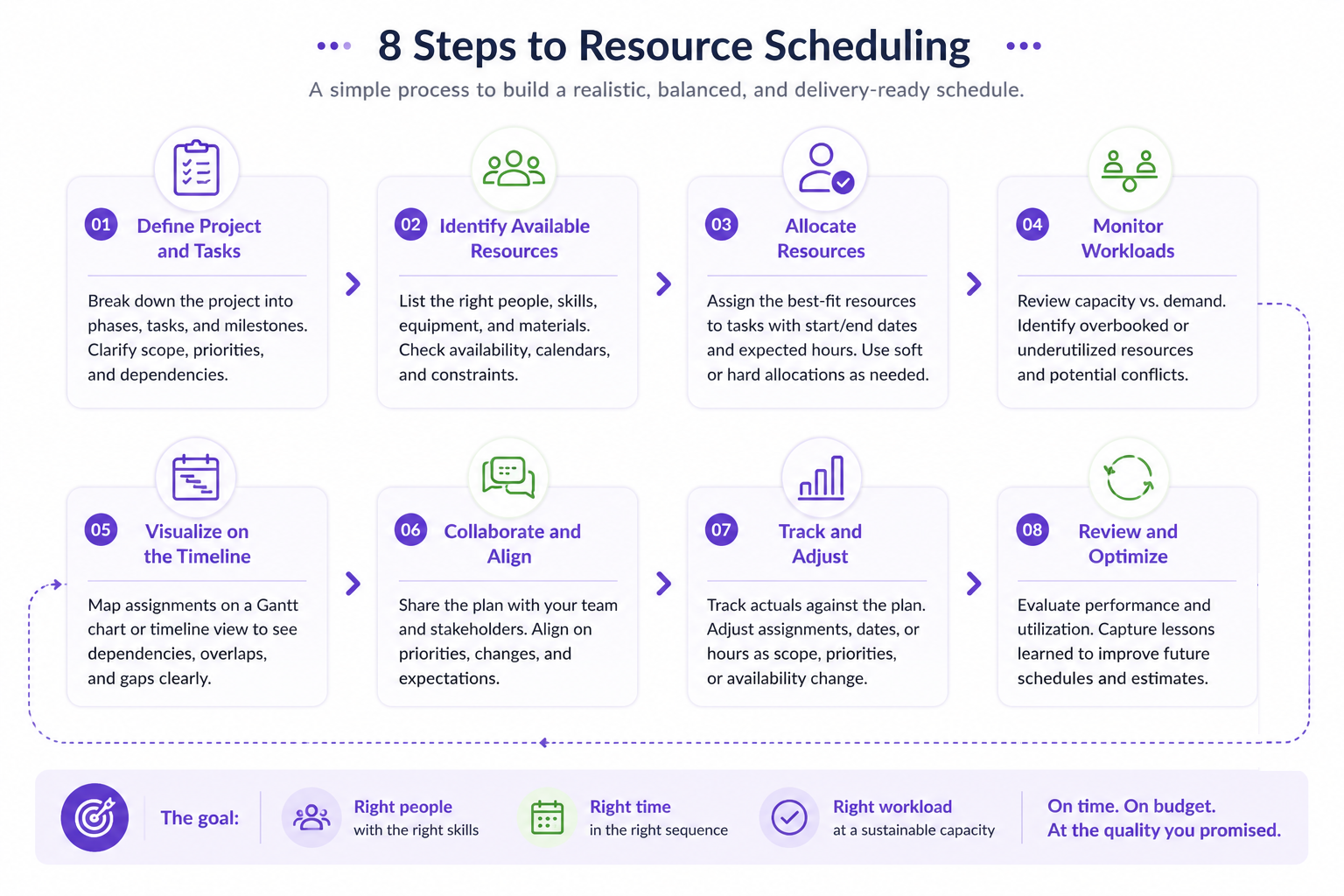
The eight steps at a glance:
- Define the project and break it into tasks
- Identify available resources
- Allocate resources to tasks
- Monitor and adjust workloads
- Visualize the timeline on a Gantt chart
- Collaborate and communicate in real time
- Track progress and adjust
- Review and optimize for the next project
Scheduling looks daunting. The right tool makes it routine. In Birdview, a resource and project management platform, you can book people, watch progress, and keep the team pointed in one direction. Here’s how our clients run the process, step by step.
1. Define your project and break it into tasks
Start with scope. Break the project into tasks you can actually staff, then give each one a timeline. Birdview lets you create tasks, set priority levels, and add start and end dates. That structure becomes the frame for every booking that follows.
Take a marketing campaign. Tasks might include “Content Creation,” “Graphic Design,” and “Ad Deployment.” Give each one a deadline drawn from your overall project timeline.
2. Identify available resources
Now look at who you have. Birdview lists every person, their role, and what they already carry. You avoid piling work on one person, and you match tasks to the right skill sets.
Say the project needs a graphic designer. The resource dashboard shows which designers sit free during that window.
3. Allocate resources to tasks
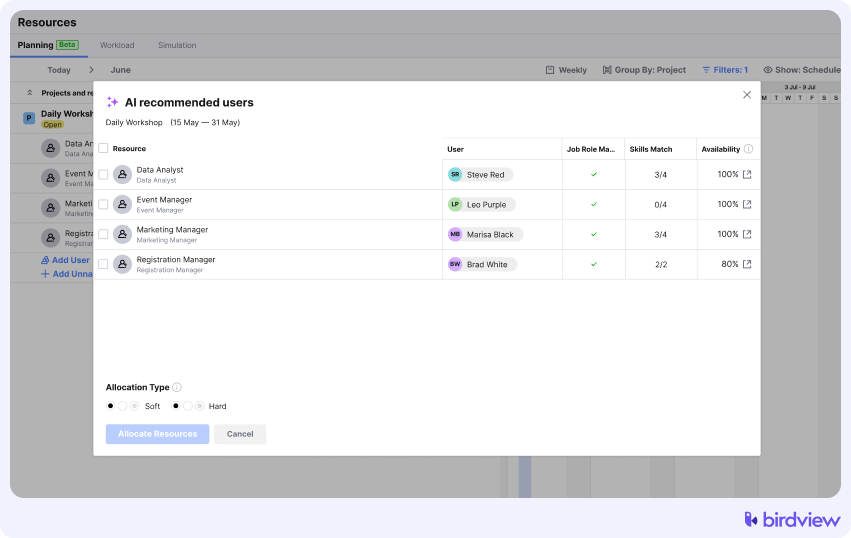
With names in hand, assign the work. In Birdview, a few clicks attach a person to a task. You also see how that booking lands inside the wider schedule, which stops double-booking and over-allocation before either one bites.
4. Monitor and adjust workloads
Workload management shows each person’s load as it changes. When someone tips into overload, you shift assignments and head off burnout. This step keeps the team balanced and productive. Skip it and the plan drifts within a week.
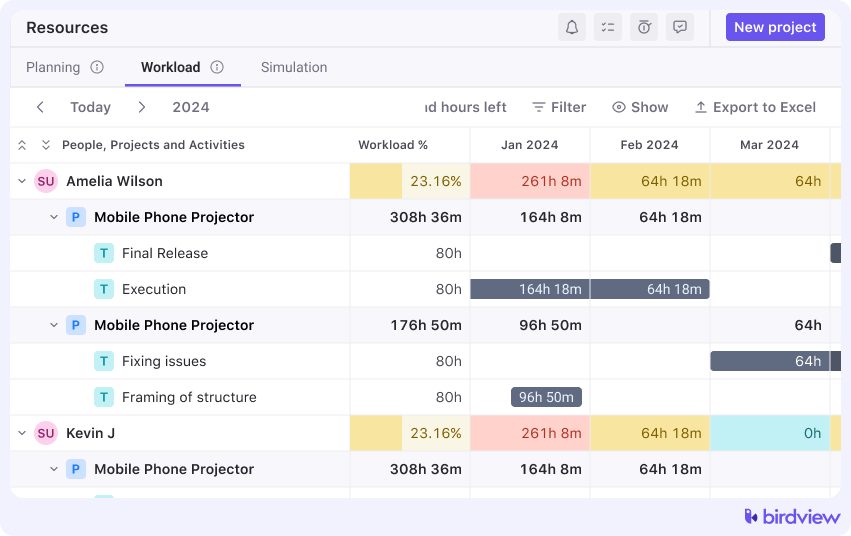
Say your copywriter picks up four tasks in the same sprint. The workload view surfaces that imbalance, and you hand a piece of it to another writer.
5. Use Gantt charts for timeline visualization
Gantt charts map your project timeline and every scheduled task in one view. They earn their keep during delivery, when you need to confirm that tasks still line up with the final deadline. Birdview’s charts also expose task dependencies, so a misaligned schedule never quietly delays the work downstream.
6. Collaborate and communicate in real time
Once delivery starts, lean on Birdview’s collaboration tools. People update task statuses, leave comments, and share files inside the platform. No side threads. Everyone reads the same picture of where the project stands.
7. Track progress and make adjustments
Birdview’s dashboards and reports show you where the project stands at any moment. You see which tasks are on schedule and which have slipped, then shift assignments to match. That real-time view is what keeps a schedule agile instead of theoretical.
8. Review and optimize for future projects
When the project closes, Birdview’s reporting shows how well you used your people. Historical data sharpens the next schedule. It exposes the assignments you got wrong, the bottlenecks nobody saw coming, and how long similar work actually took. We see the same pattern with our clients: the second project schedules far more accurately than the first, because the numbers replace the guesswork.
Resource scheduling software
Resource scheduling software is a tool that handles the busywork of assigning people to projects. Spreadsheets go stale. Manual tracking eats hours. Software does that work for you and refreshes the numbers in real time.
The payoff shows up fast. You run the team with less guesswork, you make fewer mistakes, and everyone stays pointed at the same project goals. Our clients tell us the biggest shift is confidence: when the schedule updates itself, nobody argues about whose version is correct.
Resource scheduling tools
A resource scheduling tool is software that helps you assign work, follow progress, and keep your team’s capacity in balance. Each tool covers a different piece of the job. Here’s what the core ones do.
Workload management
Workload management tools balance tasks across the team by showing how much work each person carries. You see who is buried and who has room. Then you shift assignments. No burnout, no idle capacity.
Resource booking
Resource booking reserves a person for a specific task at a specific time. Nobody gets double-booked. This matters most with specialists who split their week across several projects, the people our clients tell us are hardest to pin down.
Job roles
Assign work to a role instead of a name, and the schedule gains slack. Drop a task on the “UX Designer” role, and anyone in that role can pick it up. Larger teams lean on this when responsibilities overlap.
The right skill set still does the work, even when one person’s availability changes overnight.
Customizable views
Customizable views let you shape the interface around your own question. Timeline, calendar, or a detailed task list: pick what answers it. That flexibility keeps attention on what matters right now.
Collaboration
Collaboration features move the conversation into the schedule itself. Comments on tasks, shared files, progress updates in real time. Everyone stays aligned, and the email thread gets shorter.
Reports and dashboards
Reports and dashboards give you a bird’s-eye view of your schedule. A dashboard shows task completion rates, resource availability, and overall project health as they change. Custom reports go deeper: individual workload, task progress, project timelines.
Resource scheduling vs resource forecasting
Scheduling and forecasting answer two different questions. Mixing them is the most common reason a resource process feels busy without ever becoming predictable.
Resource scheduling assigns named people to specific tasks inside a live project: who works on what, this week and next. Resource forecasting estimates demand against capacity over a longer horizon, mostly across work that has not started yet: pipeline, renewals, planned phases.
| Dimension | Resource Planning | Resource Scheduling | Resource Forecasting |
|---|---|---|---|
| Primary Question | What resources will we need? | Who will do the work, and when? | What resource demand will we have in the future? |
| Time Horizon | Medium to long term | Short to medium term | Future periods based on expected demand |
| Level of Detail | Roles, skills, capacity, and resource requirements | Named resources, tasks, dates, hours, and assignments | Expected demand, capacity gaps, and future requirements |
| Typical Inputs | Pipeline, project requirements, roles, skills, and available capacity | Tasks, availability, calendars, dependencies, workload, and deadlines | Pipeline, historical demand, confirmed work, and expected projects |
| Output | Resource requirements and capacity plan | Detailed resource schedule | Future demand and capacity forecast |
When should a resource manager use scheduling instead of forecasting?
Use scheduling when the work is committed and the question is execution. The project exists, the tasks are defined, and someone has to do them. Use forecasting when the work is probable rather than committed, and the decision is about capacity rather than assignment: whether to hire, when the bench appears, whether you can deliver a proposal. SPI Research measures both questions inside the same five-pillar framework. Its 2026 model reports revenue growth 1,200% above level 2 peers at the top maturity level: the gap between firms that answer both questions and firms that answer only the Monday one [1].
The practical rule is simple. Scheduling cannot answer a hiring question, and forecasting cannot answer a Monday question. Run both from the same weekly schedule and you get a plan that is either too detailed to forecast with or too coarse to work from.
Can scheduling and forecasting conflict?
Yes, and the conflict is useful information. The forecast says a skill runs short next quarter. The schedule keeps handing that same person new short-term work. Those two views describe a real trade-off, not a data error. The resolution is a decision (protect the specialist, hire, or decline scope), not a reconciliation exercise.
Do you need both in the same system?
They need to share resource data, not to live on the same screen. This is a management-system question rather than a tooling preference: ISO/IEC 20000-1:2018 treats planning, design, transition, delivery and improvement of services as one system with shared controls, not as separate activities that happen to run in the same firm [2].
Scheduling and forecasting that read from different lists of people, skills, and availability will disagree forever. Worse, you discover the disagreement at the worst possible moment. One shared resource record, two views: that combination is what surfaces the conflict above early enough to act on it. If you are building this from scratch, start with forecasting resource demand.
FAQ
What is resource scheduling in project management?
Resource scheduling is the process of assigning specific resources (most often people) to tasks inside a project timeline. The goal is simple: the right person on the right task at the right time.
What is the difference between resource scheduling and resource forecasting?
Scheduling puts named people on committed tasks across days and weeks. Forecasting weighs expected demand against capacity across quarters, for work nobody has started yet.
What data is needed for resource scheduling?
You need the list of resources, their availability, task requirements, the project timeline, task dependencies, resource capacity, and the budget. Those are the seven inputs covered above.
How often should a resource schedule be updated?
Update it weekly for committed work. Update it the same day when scope, availability, or a delivery date shifts. A schedule you refresh monthly describes the past, not the plan. The forecast behind it moves to a slower beat: quarterly, or whenever the pipeline changes in a serious way.
How do you do resource scheduling step by step?
Define the project and break it into tasks. Identify who is free, then assign them. Watch workloads and adjust. Map the timeline, work out loud with the people on it, follow delivery as it happens, and review once the project closes.
What are the benefits of resource scheduling for a services firm?
Sharper efficiency and time management. Fewer booking clashes, clearer ownership, and steadier utilization across the bench. Better inputs feed the forecast, and costs drop because you skip the overtime and the last-minute hire.
Sources
- SPI Research – Professional Services Maturity Model™, 2026 benchmark –
https://spiresearch.com/ps-maturity-model/ - ISO/IEC 20000-1:2018, Service management systems (requirements). International Organization for Standardization.
https://www.iso.org/standard/70636.html

